
Collects info from leads
Qualify and close leads, then get the details sent to you by email or text message.
Upfirst is the AI answering service that keeps your phone covered so you never miss a lead or leave a customer waiting.
No credit card required
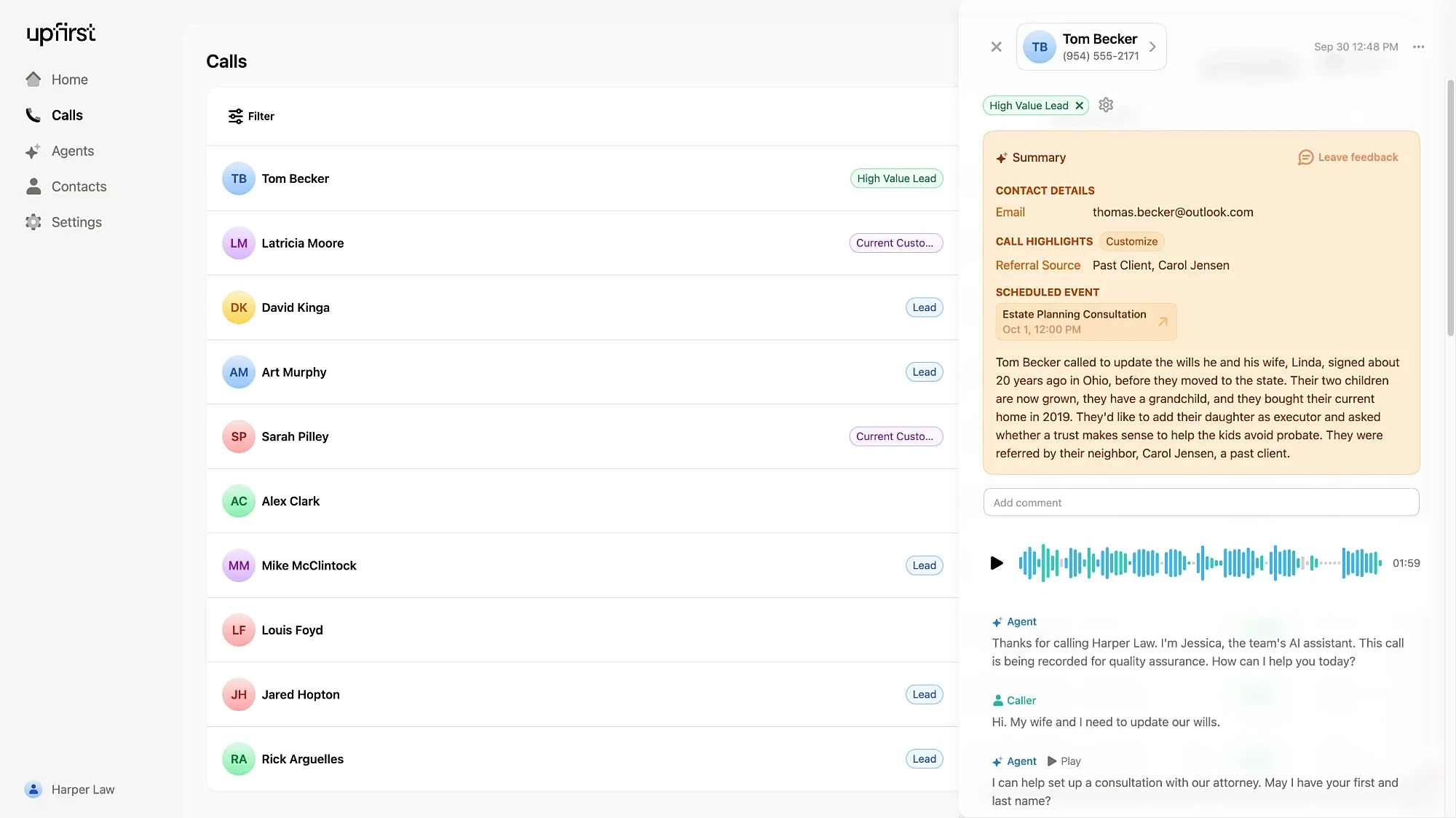


Qualify and close leads, then get the details sent to you by email or text message.
Upfirst checks your calendar while the caller is on the line and books an open time.
With warm transfers, your agent tells you who's calling and what they need, so you can decide whether to take it.
Add your hours, services, and prices, or import them straight from your website.
Upfirst answers in English, Spanish, and 35+ other languages, and switches when a caller does.
Robocalls and sales pitches get caught and hung up on. You're never charged for spam calls.
“I just felt so much better knowing that I had a reliable AI receptionist. I had that security of knowing I wasn't missing out on anything.”
Add Upfirst to ChatGPT as a plugin or to Claude as a connector. Tell it what you need in plain English, and it updates your receptionist for you.
Help me set up Upfirst (https://upfirst.ai), an AI receptionist that answers calls for businesses. Guide me through the setup end to end.

Read these docs first so you know how Upfirst works:
- Setup guide: https://upfirst.ai/docs/setup-guide.md
- Call forwarding guide: https://upfirst.ai/docs/call-forwarding.md

Then walk me through these steps, one at a time:

1. Account. Start by asking me if I already have an Upfirst account. If not, send me to https://app.upfirst.ai/sign-up to start a free trial. Stay with me through sign-up until I pick my Upfirst phone number. Picking a number doesn't change my current business line.

2. Connect. Help me add Upfirst to this chat. Give me the link for the assistant you are, and don't send me looking through settings:
- ChatGPT: https://chatgpt.com/plugins/plugin_asdk_app_6aa057dfb19c81919777fdc34a9d1f12?search=upfirst
- Claude: https://claude.ai/directory/upfirst
I open the link, add Upfirst, and sign in with my Upfirst login. Once connected, run get_account_overview and tell me what you see. If my receptionist has no phone number, tell me to finish sign-up first.

3. My business. Use what you already know about me, and read my website if I have one. Then ask only for what's missing, in one short list.

4. Setup. Following the setup guide, set up my greeting, what my receptionist knows, which calls to transfer, and texts to send callers. Tell me what you set up in plain language. For anything that can only be done in the Upfirst dashboard, like who gets notified about calls or connecting my calendar, tell me exactly what to click.

5. Test. Have me call my Upfirst number from my own phone, as a typical customer. Review the transcript with me and fix anything my receptionist got wrong. Repeat until I'm happy.

6. Go live. Help me forward my business line to my Upfirst number using the call forwarding guide. Ask which phone carrier or system I use, and whether I want all calls or just the ones I miss.

Be opinionated. When there's a sensible default, use it and tell me what you chose, instead of asking me to pick between options. Keep your messages short.



Want to hear it first? Call our AI receptionist at (833) 564-4778.
Yes. Most customers keep their business number and forward their calls to Upfirst. Every plan also comes with its own Upfirst number.
Yes. You can forward all your calls to Upfirst, only the ones you miss, or only the ones you get after hours. You can change this in your cell phone's settings or in your phone system's online portal. If you need help setting up forwarding, just let us know.
You decide what happens. Upfirst can transfer the call to you or someone on your team. Or your receptionist can politely explain that no one is available right now and that someone will call them back.
Create an account and enter your website. Upfirst uses it as a starting point to train your receptionist, and you can change anything after that. You can also connect Upfirst to ChatGPT or Claude and let it do the setup for you. If you want help, our support team is available by live chat, and we offer a free 30-minute onboarding call.
Plans start at $24.95 a month for 30 calls. Annual plans are 20% off, and we offer custom plans if you get more than 600 calls a month. You can try Upfirst free for two weeks. See all plans on our pricing page.
No. Upfirst detects spam automatically, and you're never billed for it. We also don't bill for calls under 15 seconds or calls where the caller never speaks, like pocket dials. Both are labeled in your call log, so you can see exactly which calls you were billed for.
Yes. Upfirst books appointments in Google Calendar, Outlook, Calendly, Acuity, Square, and Clio. With Custom Actions, you can connect nearly any app that has an API, so your receptionist can look up or log information in the tools you already use while it's on a call. Upfirst also connects to thousands of apps through Zapier.
No problem. You can upgrade or downgrade anytime. There are no contracts, and you can cancel from your account.
 Gmail
Gmail Messages


%20--%3e%3csvg%20version='1.1'%20id='Layer_1'%20xmlns='http://www.w3.org/2000/svg'%20xmlns:xlink='http://www.w3.org/1999/xlink'%20x='0px'%20y='0px'%20viewBox='0%200%2044%2044'%20style='enable-background:new%200%200%2044%2044;'%20xml:space='preserve'%3e%3cstyle%20type='text/css'%3e%20.st0{fill:%230070E0;}%20%3c/style%3e%3cpath%20class='st0'%20d='M38.7,8.4l4.2-6l-5.3,4.8c-3.9-4.3-9.5-7-15.7-7C10.2,0.2,0.6,10,0.6,22c0,12.1,9.6,21.8,21.4,21.8%20c11.8,0,21.4-9.8,21.4-21.8C43.4,16.9,41.6,12.2,38.7,8.4z%20M36.9,29.2c0,4.4-3.5,8-7.8,8H15c-4.3,0-7.8-3.6-7.8-8V14.8%20c0-4.4,3.5-8,7.8-8h14.1c2.4,0,4.5,1.1,5.9,2.8L21.9,21.6L13,15.4L19.5,28c0,0.1,0.1,0.1,0.2,0.2c0,0,0,0.1,0.1,0.1%20c0.1,0.1,0.1,0.2,0.2,0.2c0.1,0.1,0.1,0.1,0.2,0.2c0.8,0.7,1.9,1,2.9,0.7h0c0.2,0,0.4-0.1,0.5-0.2c0,0,0,0,0.1,0%20c0.2-0.1,0.3-0.2,0.4-0.3c0,0,0.1-0.1,0.1-0.1c0.1,0,0.2-0.1,0.2-0.2c0,0,0.1-0.1,0.1-0.2c0,0,0,0,0.1-0.1l0.1-0.1%20c0.1-0.1,0.2-0.2,0.2-0.3l11.3-16.2c0.4,0.9,0.6,1.9,0.6,2.9V29.2z'/%3e%3c/svg%3e)

